Describing Places Using Key Words and Google Maps
Jan 12th


Source: National Geographic (Education)

Watch this video. Afterwards, you need to describe the places that you have seen in the video, so watch carefully.
Q. As we describe the places we see, what sort of special words can we use? We are trying to use Geography key words …
Mini Norway – a Tilt Shift Movie from Davide Vasta on Vimeo.
Now we will do the same for a different place …
Bird’s eye Bangkok from Pieter Manders on Vimeo.

What Geography Key Words can we use when describing places?
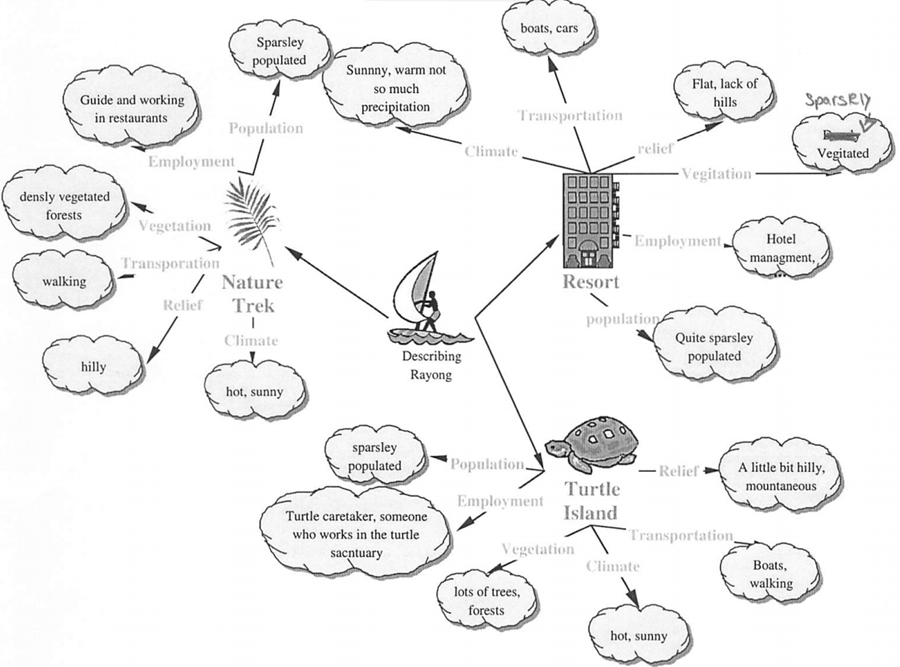
Putting it all together – here is how a student once applied such key words to three locations around Rayong in Thailand.
Discourse And Bias, Knowledge and Filters
Aug 28th
Some Key Questions:
· What are the differences between the following: information, data, belief, faith, opinion, knowledge and wisdom?
· How much of one’s knowledge depends on interactions with others?
· To what extent does personal or ideological bias influence our knowledge claims?
· Does knowledge come from inside or outside? Do we construct reality or recognise it?
Task 1. Look at the following picture. Generate a single sentence headline statement to describe / explain what has happened here.
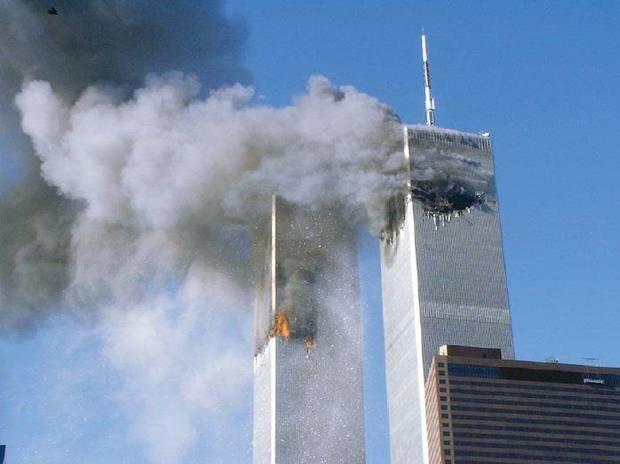
Source: Photo courtesy FEMA (Public Domain)
Task 2. We will now discuss / share our headlines, and identify any bias.
What assumptions / presuppositions do you include so that your statement / headline makes sense? Why are these presuppositions good? Why can they be disadvantageous?
What is the most neutral statement that we can arrive at as a class?
Task 3 – Explore how things / ideas / concepts might be viewed differently in different cultures.
View this slideshare, which contains the very clever infographics by Yang Liu and take it in turns to explain what each slide is trying to imply about cultural assumptions:
Discuss any examples you know of, perhaps between the different cultural backgrounds of the students in this class.
Task 4 An excellent article on Critical Thinking by Richard van de Lagemaat
Access his article by clicking here – http://ibo.org/ibworld/documents/may02.pdf – and going to page 15. Read it carefully and be prepared to discuss.
Task 5 Avatar.
Most people have seen this movie. To remind …
Avatar is about an entirely different world, set in the future. It is not about our world right?
Or is it? Perhaps an imagined world like this is filtered through the creator’s experiences of this world.
Discuss. What (cultural) assumptions are made in the movie? What biases? What might the audience be learning / accepting about our world by watching this that might in fact not be true / accurate / fair?
Task 6 Find an online article, video clip, image, or other source that reveals cultural bias and messages that seem to be easily accepted by society, especially if we don’t apply some critical thinking.
Some ideas on the sort of resources you can include:
- A youtube trailer to a movie
- An advert
- A poem
- A news article
Some ideas of the sorts of things which the resource gives some biased ideas about:
- Role of men / women
- Ideas of beauty
- Status / jobs / money
- Assumptions about different nationalities / ethnic groups
- Assumptions about proper behaviour – right and wrong
- Hierarchy / Power
Make the resource easily accessible – a short youtube clip, an image, an easy to read news article. You can take this from any culture.
Share a link to the resource. Include some text to explain the discourse and bias that is contained inside the resource:
The link to the resource.
- What messages are conveyed that may in fact not be real are conveyed.
- Why are these messages accepted by society even if they don’t match reality?
- How do these messages / assumptions/ biases continue to survive?
- Extra: can you link this to the filters mentioned in the article (task 4) – perception, language, emotion, and reason? (Don’t worry if not at this stage, we will go into these inn much more depth later in the course).
Task 7 – Reflect
·Describe in your own words what we mean by the term ‘filter’ in TOK?
· What do you think is the most important / influential / powerful filter that affects you?
· Why is it important to know about the filters and how they affect the way you view the world?
Much credit goes to Mr Kevin Hoye, originator of many of the ideas contained in these tasks.
Introduction to TOK – What is Knowledge?
Aug 21st
Key Questions:
1. What does it mean to know something? What is knowledge? How do we know what is real?
2. How is Knowledge different from Belief?
3. What do we mean by the word True?
Resources to help us:
The TOK diagram.
How do we know what is real? …
Are we living in The Matrix?
Plato’s Allegory of the Cave
If you like the above animation (which is quite dated but very useful for explaining Plato’s allegory, you might also like this shorter,more recently produced version:
More information
http://en.wikipedia.org/wiki/Allegory_of_the_Cave
http://tamayaosbc.wordpress.com/2008/07/10/74/
http://www.philosophypages.com/hy/2h.htm

Image – licensed under CC, details here.
Descartes and the Matrix

Geography Matters
Aug 11th


Big Picture Questions:
What is Geography?
 Why is it important to study Geography?
 How do we think, speak and write as Geographers?
Watch and Discuss:
Source: Geographical Association
Think and Discuss / Share:
- What is Geography?
- Where are the places I have studied in Geography?
- Why is Geography important?
- Who is Geography important to?

You need to be able to use special key words in Geography. This slide show introduces some, and you can view this as a class.
You also need to recognise that there are different types of Geography.

Suggested Activity 1 – Using Photographs in Geography
In pairs, download the worksheet below by clicking here or on the picture below.
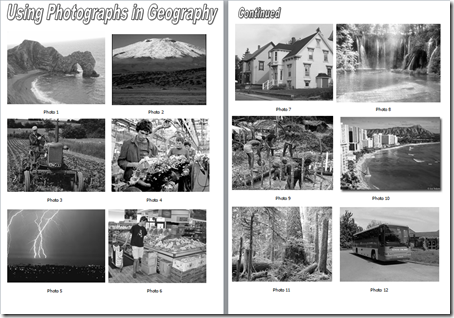
(Too slow to download? Try clicking here instead).
For each picture, discuss and agree what could be suitable questions to ask about the picture as a Geographer. Record your questions.
As an example, look at the first picture, on the top left. You could ask …
- Where is it?
- How was the arch formed?
- How is the beach formed?
- How does the sea affect the land here?
Afterwards, as a class, we could share our questions and others in the class might try and answer some of them.
Suggested Activity 2 – Earth from Above
Introducing Yann Arthus-Bertrand, an exceptional French photographer who has taken countless aerial photos of the world’s surface from a plane or helicopter. He cares very much about the future of this planet.
Also introducing Google Earth, which we will be using later in this course.
Working in a small group (two or three) select a photo from Yann’s website. You can download an individual image. Prepare a short piece of text to describe the photo as a Geographer, using Key Words and Pointing out the difference between Physical and Human Geography. Explain why it is important to know about this. Share the image and the text with your teacher, by email.
Explore the photos here, and notice how you can choose your country.
Suggested Activity 3 – Focus Questions
1. Write a sentence to say what the word “geography” means.
2. Write an explanation of what the study of “Physical geography” is and give some examples of particular topics that are included in the study of physical geography.
3. Explain what the study of “Human Geography” is, and give examples of some human geography topics.
4. How can the knowledge and study of geography be useful?
Terminology; learning to speak geographically!
Geography has its own set of words like every other subject.
Start a glossary (word list with meanings) of geographical terms. Start with these words. Take care to spell them correctly.
Relief Drainage Vegetation Settlement Climate Population Transport Work or employment Economic Activity
(The first slideshow under ‘Discover’ above should help you).

Share your thoughts on what Geography is and why it is important with your neighbour. Be prepared to share these thoughts with the whole class.

1) Find an image of a really interesting place you have visited outside of Bangkok at some point in your life. (Preferably a picture you or a family member/friend have taken yourself, but if not you might use this flickr search link – if so, you should include the name of the flickr user who created the photo you choose.
2) Write 50 – 150 words of text to say why that place is so important to you.
3) Bonus points if you can include three or more Geography key words and pointing out if it shows Physical, Human or Environmental Geography or a mixture of these.
3) Create a postcard from steps 2 and 3 to share with your Geography teacher next time you see them.

These activities are designed to last for four single lessons / two double lessons and one homework.
Extension Materials:
Geography Key Concepts Slideshare
You can see a short video of one of Yann’s photo exhibitions here. Yann has also created an hour long movie called Home.
Credits:
Earth ‘Blue Marble’ Image: Public Domain, by NASA as stored here.
Dustbin game discovered on http://www.geographyalltheway.com
Alternative Approach for the Connect section:
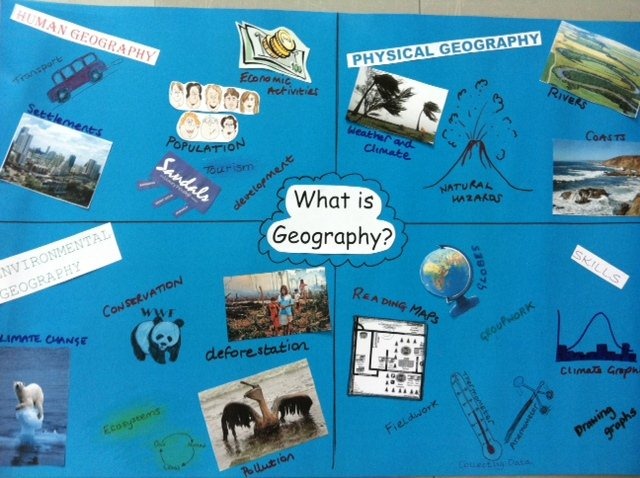
Use a Maps from Memory Activity – use an image like this one here. Thanks Caroline.
Learning From Mistakes
Jun 11th
I used a modified version of this for an assembly presentation at Bangkok Patana School. The message is simple, and well known, yet is still an important one to raise with students. It should be quite easy for someone else to recycle this and explain the gist of the slides. The early slides (and video) are deliberately designed to make people laugh – mistakes are often funny after all – but the presentation takes a more serious turn on slide 8 when the audience are reminded that often your own mistakes do not feel very funny at all. The remainder of the presentation provides timeworn suggestions of how best to manage your mistakes and make the most of them, recognising that mistakes are vital to human progress.
Composition in Photography
May 28th
This post includes a few useful links and one video to help you explore one of the most important elements of good photography … composition.
10 Top Photography Composition Rules by PhotographyMad
5 Elements of Composition in Photography by Digital Photography School
5 More Elements of Composition in Photography by Digital Photography School
25 Photo Composition Tips by photofocus
The Rule of Thirds is explained in a bit more detail here:
Rule of Thirds by Digital Photography School
Panning–Capturing A Sense of Sideways Motion
Mar 14th
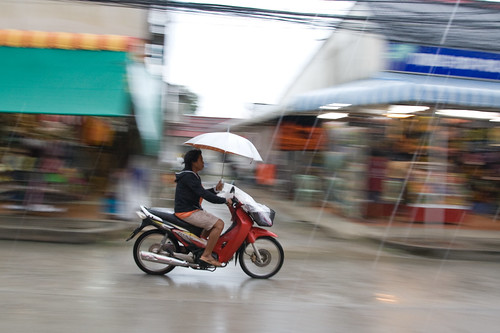
Image: Some rights reserved by zoutedrop
The above photo achieves a nice effect. The subject of the photo is respectably crisp (in focus) but the background is deliberately blurred to give a sense of the movement which is happening here. The techniques used by the photographer is known as panning and you should give it a go.
First, check this video …
Now read up from one or both of these useful sites:
Mastering Panning – Photographing Moving Subjects by Digital Photography School
Mastering the panning technique by Gavin Gough
Exposure and Long Exposure
Feb 21st
The first video summarises the three crucial controls needed to get exposure right – Aperture, Shutter Speed and ISO.
This excellent interactive SLR camera simulator allows you to experiment with these controls on a virtual camera:
This second video sets us an assignment to create long-exposure photography. Here, the photographer uses a classic scenario – moving car lights. (the same technique could be applied to many scenarios where general light conditions are very low but bright lights are moving fast – think of some others for yourself). Notice first that one extra key ‘ingredient’ is needed … a tripod. Notice, too, that this technique involves all three controls (aperture, shutter speed and ISO)
Mastering Light in #Photography 1 – Adjust Your ISO Settings
Jan 24th
If photography is ‘writing with light’, we need to learn how to control the light entering our cameras if we are to take successful shots.
There are three ways of controlling light – adjusting aperture size, shutter speed or ISO settings.
ISO settings refer to the sensitivity of the camera’s sensor to light. The sensor is at the back of the camera, inside the body, where the image is captured electronically. In more traditional cameras, this is where the film would be. In film cameras, we need(ed) to choose the speed (or sensitivity) of film for different light conditions.
Low ISO film and low ISO settings on a digital camera need lots of light to capture the image, but give the sharpest image and richest colours as a result. Think bright sunny days giving vivid and clear images.
High ISO settings work with low light conditions, which is the number one reason to use them, but the quality of the picture can be noticeably degraded compared to those taken with a low ISO number in sufficient light. High ISO images tend to have noticeable ‘noise’ or a graininess which may not be desirable, but still may be preferable to switching on the flash. That said, some photographers actually make deliberate use of the graininess, which can look very striking for example on black and white portraits.
Some modern and more expensive SLR cameras give impressive shots even at very high ISO settings with less noise visible.
The key thing is, you should experiment with your ISO settings to adjust the quality of the image but also to allow you to take pictures in dim light to good effect.
It is the one of the three settings which is often forgotten about, but setting the right ISO allows you more flexibility with aperture and shutter which is why I’d start experimenting with this first.
Resources:
ISO Settings in Digital Photography by Digital Photography School.
Use a High ISO to Create Grainy Shots by Digital Photography School.
ISO by MichaelTheMentor
ISO Basics by ulufilms:
Camera Tutorials – ISO by QQQcon