Archive for year 2010

Economics Game: Ricardo, Coconuts and A Desert Island
Dec 2nd
This is a good online game (you need Flash player in your browser) to learn about and develop your understanding of the concept of Comparative Advantage.
Great for IB Economics students, and possibly handy for IGCSE level students too.

Image: Some rights reserved by Dana Moos, Realtor
Play the game here: http://desertislandgame.com/
Extra: By the way, the name of the guy you play is Ricardo and, in case you don’t already realise, this is significant. Look the name David Ricardo up (on wikipedia for example) and find out why.
Experiments in Online Drawings
Dec 1st
As a teacher of Economics encouraging use of collaborative tools such as Google Docs, I am keen to find a good solution for students to (co-)create drawings they can quickly access, share and publish online.
Google docs now of course has a drawing app as part of its suite of online software. This is, as far as I can tell so far, very good. I have still yet to use it with students. One of its main advantages has to be the ability to add the same sharing controls as you can on other Google Docs. I will give it a go soon.
Recently, I experimented with an alternative. Dabbleboard which in some ways still feels like the beta software it is. However it carries some advantages which I like:
- Add extra ‘pages’, effectively making a slide show of drawings (see example below)
- You can save / embed / download the end results quite easily.
- Intuitively interprets gestures – a rough line gets picked up and converted in to a neat straight line
- You can click and type text without having to select the text icon
- The controls are generally good (such as quick clone, multiple selection for grouping)
- Integrates with a tool called tokbox so you could record/video conversations in response to the drawings (I haven’t used this)
- People can join a drawing without signing up / registering – just share the email link / embed the image for others to access
Disadvantages:
- Over-sensitive interpretation of your rough gestures – drawing a curve all to easily becomes a square, for example
- Less control over editor rights – when I embedded it for access to the students so that they could take control, any ‘random’ guest visitor could take control without my knowing who – lots of fun in class, but a wider worry for who can access and edit (the embed below is locked for editing, but its a shame it is all or nothing approach).
Overall a good option for a rough and ready drawing facility that produces good results. Will experiment further with the sharing / collaborative side of things.

Recap – A collection of ‘Live’ Output and Cost Curves
Nov 30th
This MS word document asks you to explore the concepts of different cost curves, and their relationships, further:
[Source unknown]
The World Scaled Down to A Village of 100
Nov 28th
Just came across this video, based on what is now a widely-read summary of some key demographic and economic statistics. These statistics do need to be verified, as the opening shot states, if not for any other reason than the age of the data. This notion of the world as a village of 100 (and the associated data) first emerged in the early 1990s.
As David Truss argues, this could be really useful for cross-curricular discussion. I’ve used the Village of 100 idea a few times – in Geography, Economics and as part of an assembly. I first received an email with this idea in 1998, and used some of it when visiting a Secondary School in southern Ghana in 2003. Teaching a Geography class of nearly 70 students, I tried to apply the same concept for some of the issues covered by asking the appropriate proportion of the class to stand up. The Ghanaian students were blown away by the proportion of their class that would live in Asia (having guessed Africa and Europe to carry the highest populations, by far). The ICT teacher at that school (who commanded a suite of 16 computers for a school of c. 2,500 students) was fascinated by the internet access statistic.
For another way of visualising global economic inequality (which features in the Village of 100 idea), I highly recommend this website:
Update:
This impressive and simple website helps you to make quick comparisons between your own country and any other – this can call up statistics that call to mind the inequality depicted in the Village of 100. Watch out for the adverts though:

Short Run Cost Curves
Nov 25th
Our eventual aim of this learning session is to understand (and know ‘like the backs of our hands’) the following diagram:

First we need to understand the difference between fixed and variable costs. This video by MJM Foodie handles this well:
This is a very good interactive exercise to consolidate your understanding of the different types of cost, and ends with a graph to show how their ‘curves’ will look. It introduces the idea of marginal costs and links changes in these costs to the theory of diminishing returns – crucial to understanding the shapes of the graphs. Read all of the text and work through the activities from start to end.
http://www.sambaker.com/econ/cost/cost.html
Now MJM Foodie begins to link us to the graphs more directly:
If you need another glimpse of how the product curve ‘translates’ to the cost curve so that the theory of diminishing marginal returns is transferred, see the first few slides of the following (after slide 3 , the slideshow really gets too technical for IB Economics):
http://www.unc.edu/depts/econ/byrns_web/Flash/Chapter_8/8_2.swf
We need to understand and be able to draw the TC, FC and AC curves.
This link helps us understand how to achieve the graph at the top – work your way through these explanations very carefully:
http://www.reffonomics.com/TRB/chapter8/COSTS6.swf
This next link gives a useful summary of the different cost curves, and includes an interactive exercise to check your understanding on Average Total Costs
http://www.kmversteeg.com/mult/9_05.swf
This is very useful for understanding the shapes of each of the cost curves:
Cost Curves Part 2 from reffonomics
Activity 7 here is a very good practical exploration of products and costs using both the EXCEL sheet and the Word Document:
http://www.economicsnetwork.ac.uk/archive/richard_green/
Finally this interactive graph allows you to ‘play’ with the set of cost curves we see in the first image of this post, showing how labour prices and fixed costs can be altered to change the gradients of the graphs, but notice how their overall shapes remain:
http://highered.mcgraw-hill.com/sites/007334365x/student_view0/chapter9/interactive_graph_2.html
Back to MJM Foodie. She explains how we can link from TC, FC and AC to ATC, AFC and AVC curves:
Finally, some more videos (if you need them) to reinforce what you should have learned by now:
Cost Curves for Firms by pajholden

Output or ‘Product’ in The Short Run
Nov 25th
a) Find out the definition for the short run (in Economics it has a specific definition).
Use google and the define: prefix.

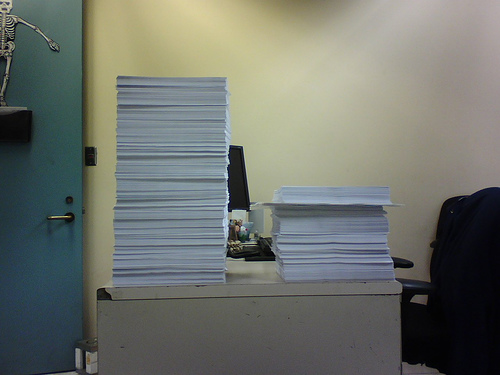
Image: Some rights reserved by °Florian
b) A practical activity in the classroom.
Rules:
1) A wall in the classroom – you can not move away from the wall, you must always stay right next to the wall. Physical land is fixed.
2) At one end of the wall a desk with a pile of raw-material-paper (or text books).
3) At the other end of the wall a desk. This is where the paper is manufactured into end-of-wall paper once it has been transferred from the other side to this desk.
4) Only one piece of paper can be carried by a worker at a time.
5) We will add more and more workers, but since no-one can move away from the wall, they can not pass each other.
6) Each production cycle (period of time) lasts one minute only.
7) All workers recognise the profit-maximising incentive of working to full ability, and behave accordingly. (No slacking …)
6) First volunteer up. Results will be recorded on a Google Spreadsheet. Access the one below and make a copy of it in your Google Account.
Direct link (make a copy in your own google account): Opengecko Product Exemplified – Carrying Books Exercise
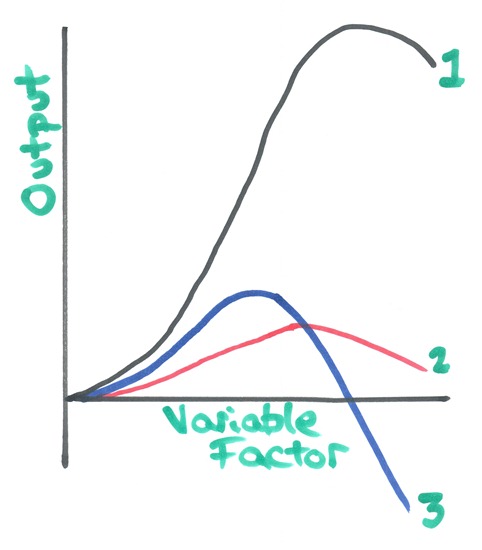
c) Make sure you have thoroughly discussed the graphs – what is happening? Why do they have these shapes?
d) Research (text book and / or web) the definitions of, behaviour of and relationship between the following as the one factor of production (labour) is increased:
- total output [total product]
- average output [average product]
- marginal output [marginal product]
Key phrase: diminishing returns (define and be precise about the full phrase)
Your ultimate aim is to be able to identify the 3 curves below and explain them:
e) Review your understanding of the above with the following videos:

#Edtech: ForgeFX Simulations – Excellent Interactive Learning Tools
Nov 24th
These online ‘immersive’ simulations by ForgeFX are brilliant, and could really help students understand some key concepts in Science, Geography, and other subjects. They require shockwave installed so that they can work in your browser.
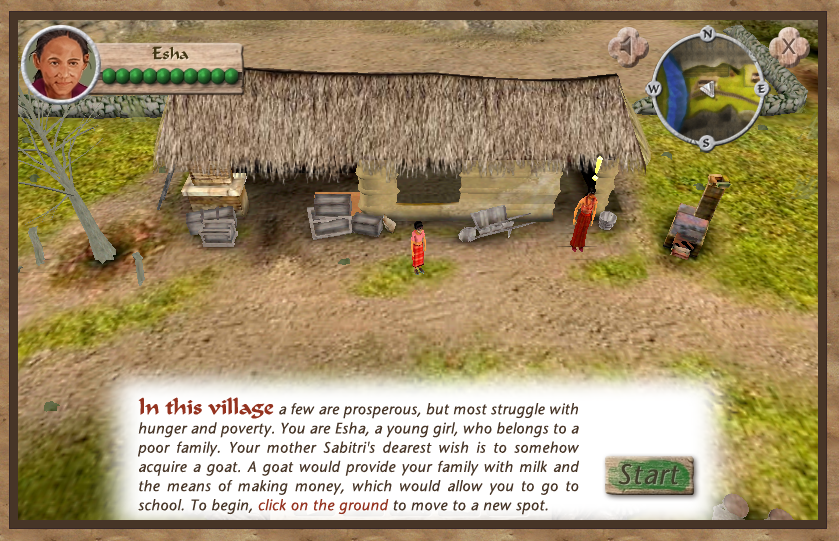
My personal favourite is the Heifer Village : Nepal (which takes time to download as it is an entire ‘3D’ game in your browser). This could definitely be used for studying development in Geography or Economics, considering sustainable farming practices through a “a serious game that teaches players about poverty and hunger”.
Other highlights for Geography include:
Topographic Maps – dig and build a piece of relief and see how it alters the contours on a map
Earth’s Biomes – explore various biomes on a globe
Seismic Waves Training Simulation – for exploring the impact of Primary, Secondary and Surface Waves
3d Water Motion Simulator – change wind speed and watch the impact on (labelled) waves
There are good Biology simulations (explore a cow’s eye, plant and animal cell simulation, genetic drift simulation and even track an ant pheromone trail)
The 3D Solar System Simulator is very impressive.
There are a few more relevant to other disciplines – explore them here and here.

Windows Live Writer – Excellent if you Blog
Nov 24th
This is one of the programs installed on my computer that I now use the most often. It’s free to download as part of the windows live essentials suite (incidentally I don’t install any of the other programmes from that suite of software as I don’t currently have a real use for them, although Movie Maker does have its place).
I am using Live Writer right now. It is simply excellent if you use any sort of well-known blogging platform such as Blogger and WordPress (I use both for different purposes).

Why is it so good? Here are a few reasons:
- It is as simple to use as a word processor. It has a simple interface, makes the most of the screen space and is much easier to use than the usual online editors many people use for their blogs.
- It has good spell check, word count, formatting options as you might expect from a simple word processor.
- You can use it offline, and then when you have created a post, you can connect to the internet and publish.
- Once you link your blog account to it (which is straightforward), it detects your theme, categories, tags, etc. and updates when those change.
- You can link to as many blog accounts as you like and switch between them easily.
- You can drag and drop pictures in and adjust their settings quickly (including the default settings of your pictures which is itself a real time saver).
- You can paste youtube embed code in (even if you are not in the html view) and it picks it up straight away.
- Adding categories, tags, time and date posted is easy to do, and it reminds you if you haven’t.
- You can easily access previous posts and pages that have been published (it detects the list and downloads the ones you choose quickly enough). This is handy if you want to adapt them.
- It is customizable with plugins developed by a community of programmers who use this software. However I no longer use these much as Live Writer is quite often updated with internal improvements that fill the same gaps that some of the plugins used to .
- You can store draft posts and pages locally, handy if you work on some posts more gradually, coming back to them in more than one sitting.
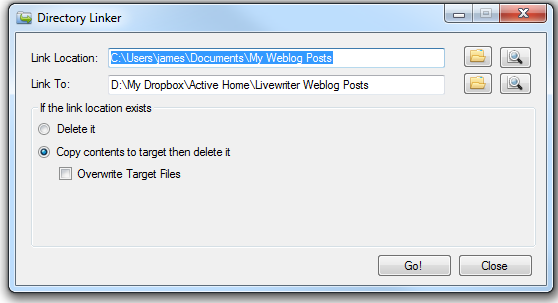
And here’s a real bonus if you use Dropbox. I am about to go home to another computer where I will pick up the next sentence on another computer … So I’ve now picked this post up again, this time from home, because it is synced across my dropbox account. You have to set this up your self using a nifty piece of software called DirLinker and redirecting the Weblog Posts default directory (in My Documents) to a folder in Dropbox. Do this on each computer. Although it is not a straightforward a solution, it’s well worth the effort if you’d like to use Live Writer across multiple computers.
Download and info: http://explore.live.com/windows-live-writer

Output or ‘Product’ in The Short Run
Nov 23rd
a) Find out the definition for the short run (in Economics it has a specific definition).
Use google and the define: prefix.

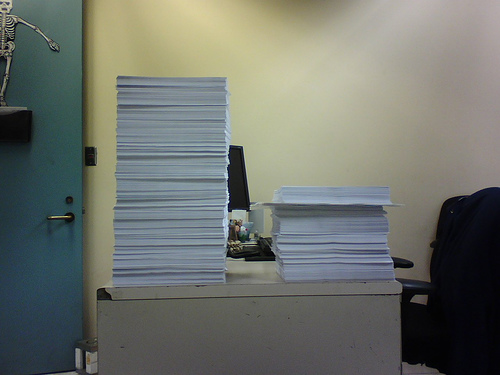
Image: Some rights reserved by °Florian
b) A practical activity in the classroom.
Rules:
1) A wall in the classroom – you can not move away from the wall, you must always stay right next to the wall. Physical land is fixed.
2) At one end of the wall a desk with a pile of raw-material-paper (or text books).
3) At the other end of the wall a desk. This is where the paper is manufactured into end-of-wall paper once it has been transferred from the other side to this desk.
4) Only one piece of paper can be carries by a worker at a time.
5) We will add more and more workers, but since no-one can move away from the wall, they can not pass each other.
6) Each production cycle (period of time) lasts one minute only.
7) All workers recognise the profit-maximising incentive of working to full ability, and behave accordingly. (No slacking …)
6) First volunteer up. Results will be recorded on a Google Spreadsheet. Access the one below and make a copy of it in your Google Account.
Direct link (make a copy in your own google account): Opengecko Product Exemplified – Carrying Books Exercise
c) Make sure you have thoroughly discussed the graphs – what is happening? Why do they have these shapes?
d) Research (text book and / or web) the definitions of, behaviour of and relationship between the following as the one factor of production (labour) is increased:
- total output [total product]
- average output [average product]
- marginal output [marginal product]
Key phrase: diminishing returns (define and be precise about the full phrase)
e) Review your understanding of the above with the following:

What Are Supply Side Policies?
Nov 23rd
Image: Some rights reserved by Re-Entry One Stop
 Here is a simple activity that could be completed as a class.
Visit this site to see a list of 12 supply side policies:
http://www.economicshelp.org/macroeconomics/economic-growth/supply-side-policies.html
In pairs or ones, create a cartoon to explain one policy from the list of 12. Your cartoon should be designed to make the idea easy to understand.
Remember to add speech bubbles and appropriate characters / setting to give the policy some meaning. Add a title that matches the policy itself.
I recommend you use toondoo which is easy to use and quick and free to sign up for.
If you use this particular piece of online software, you can share it as a public comic book so that it can then be embedded on a website.
Looking for an example of toondoo? Here is a great cartoon by my colleague Maree (this one introduces three different economic systems):